Content Menu
● Understanding the Importance of Integrating Instagram on Your Business Card
>> Expanding Your Reach and Engagement
>> Enhancing Brand Recognition
>> Modernizing Your Networking Approach
● Key Elements to Include on Your Instagram Business Card
>> Instagram Logo
>> Instagram Handle
>> QR Code
>> Instagram URL
● Designing Your Instagram Business Card: Best Practices
>> Keep It Simple and Clean
>> Use Consistent Branding
>> Choose the Right Layout
>> Use High-Quality Graphics
>> Proofread Carefully
● Ways to Display Your Instagram Information
>> Instagram Logo and Username
>> Instagram QR Code
>> Instagram Nametag
>> Mimic Your Instagram Profile
● Tools and Resources for Creating Your Instagram Business Card
>> Canva
>> Adobe Express
>> Vistaprint
>> Moo
● Digital Business Cards
>> Digital Business Card Apps
>> How to Add Instagram on Digital Business Cards
● Tips to Enhance Instagram Visibility
>> Keep It Simple
>> Networking Context
>> Consistent Branding
● Conclusion
● FAQ
>> 1. What Instagram info should I put on my business card?
>> 2. How do I make my Instagram handle stand out on my business card?
>> 3. Can I use a QR code to link directly to my Instagram profile?
>> 4. What are the benefits of adding my Instagram to my business card?
>> 5. What if I don't have a logo for my business?
● Citations:
In today's digitally-driven world, a business card is more than just a piece of paper; it's a tangible representation of your brand and a gateway to your online presence. Among various social media platforms, Instagram stands out as a powerful tool for visual storytelling, brand building, and direct engagement with your audience. Therefore, knowing how to effectively integrate your Instagram presence onto your business card is crucial for modern networking and marketing strategies [6]. This article will guide you through various methods and tips to make the most of your Instagram business card integration, ensuring it aligns with your brand identity and professional goals.
Understanding the Importance of Integrating Instagram on Your Business Card
Expanding Your Reach and Engagement
Integrating your Instagram details on your business card allows you to bridge the gap between offline interactions and your online community [6]. By providing a direct route to your Instagram profile, you encourage potential clients, customers, or collaborators to explore your content, engage with your brand, and stay updated with your latest activities. This can lead to increased brand awareness, a stronger online following, and more meaningful connections [10].
Enhancing Brand Recognition
Consistency is key in branding. By featuring your Instagram handle, logo, or QR code on your business card, you reinforce your brand identity and make it easier for people to recognize and remember you [4]. This is especially important for businesses and individuals who rely on visual branding to convey their message and attract their target audience.
Modernizing Your Networking Approach
In an era where digital interactions are becoming increasingly prevalent, a business card with integrated social media information demonstrates that you are forward-thinking and adaptable [4]. It shows that you understand the importance of online presence and are actively leveraging social media to connect with others and grow your brand.
Key Elements to Include on Your Instagram Business Card
Instagram Logo
The Instagram logo is a universally recognized symbol that instantly identifies your presence on the platform [4]. Including the logo on your business card is a simple yet effective way to draw attention to your Instagram account and prompt people to explore your profile. You can download the official Instagram logo from their website or use a business card template that already includes it [7].
Instagram Handle
Your Instagram handle is your unique username that people use to find you on the platform [6]. It typically consists of an "@" symbol followed by your username (e.g., @yourusername). Make sure to include your handle prominently on your business card, using a clear and legible font [9]. This allows people to easily search for you on Instagram and follow your account.
QR Code
A QR code is a scannable barcode that directs people to a specific URL when scanned with a smartphone [7]. By creating a QR code that links directly to your Instagram profile, you provide a seamless and convenient way for people to access your account without having to manually type in your username. You can generate a QR code for your Instagram profile using online QR code generators or directly through the Instagram app [3].
Instagram URL
Including your full Instagram URL (e.g., instagram.com/yourusername) on your business card is another way to ensure that people can easily find you on the platform [6]. This option is particularly useful for individuals who may not have an Instagram account but still want to check out your profile through a web browser.
Designing Your Instagram Business Card: Best Practices
Keep It Simple and Clean
When designing your Instagram business card, it's important to prioritize clarity and readability. Avoid cluttering the card with too much information or distracting design elements [4]. Instead, focus on highlighting the key elements, such as your Instagram logo, handle, and QR code, in a clean and visually appealing manner.
Use Consistent Branding
Your business card should reflect your overall brand identity, including your logo, color scheme, and typography. Use the same branding elements on your business card as you do on your Instagram profile and other marketing materials [4]. This helps to create a cohesive and recognizable brand image.
Choose the Right Layout
Consider the layout of your business card and how your Instagram information will be integrated into the design. You can choose to place your Instagram logo and handle alongside your other contact information, or you can dedicate a separate section of the card specifically for your social media details [6]. Experiment with different layouts to find one that is both visually appealing and functional.
Use High-Quality Graphics
Make sure to use high-quality graphics and images on your business card, including your Instagram logo and QR code [10]. Avoid using blurry or pixelated images, as this can make your card look unprofessional.
Proofread Carefully
Before printing your business cards, double-check all of the information to ensure that it is accurate and up-to-date. This includes your Instagram handle, URL, and QR code. Typos or errors can make it difficult for people to find you on Instagram and may damage your credibility.
Ways to Display Your Instagram Information
Instagram Logo and Username
Using the Instagram logo alongside your username is a straightforward way to tell people how to find you on the app. It's simple, clean, and instantly recognizable [7].
Instagram QR Code
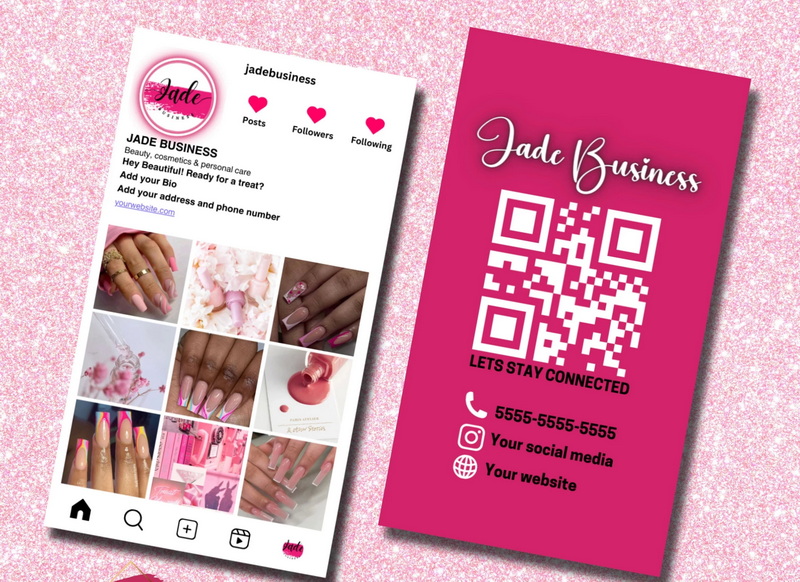
Adding a QR code to your business card directs users straight to your Instagram profile when scanned. This is more actionable and convenient than a social media handle [7]. To grab your Instagram QR code, open your Instagram mobile app, head to your profile, and tap on your menu. Then, select “QR code” and take a screenshot that you can include in your business card.
Instagram Nametag
Instagram Nametags are unique, scannable codes that make connecting with your Instagram profile quick and effortless [10]. Ensure the printed Nametag is clear and scannable. This approach is modern and tech-savvy, facilitating easy connections with potential clients and partners.
Mimic Your Instagram Profile
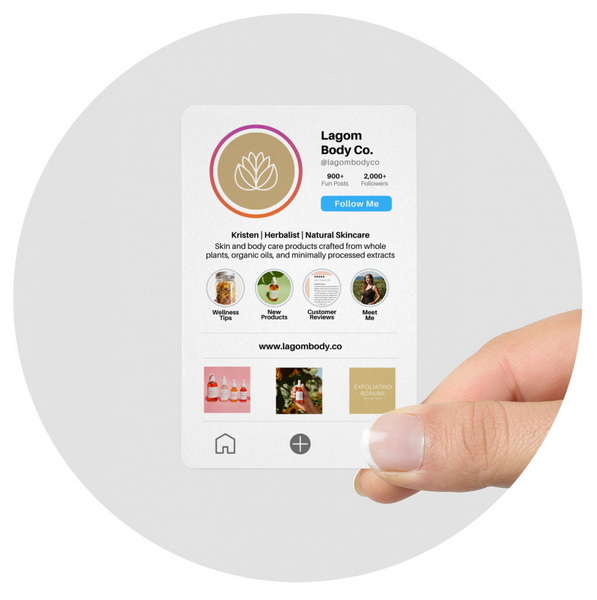
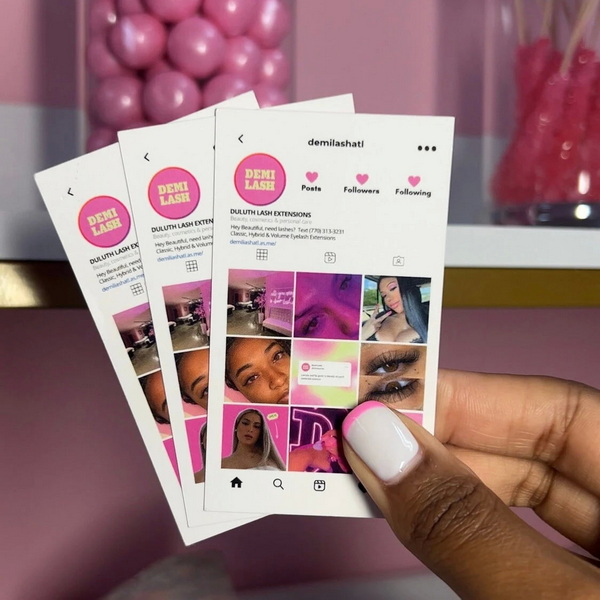
Design the front of your business card to resemble your Instagram profile, including your profile picture, username, and a snapshot of your bio. This method immediately connects your physical card with your online presence and showcases your brand style [10].
Tools and Resources for Creating Your Instagram Business Card
Canva
Canva is a user-friendly design platform that offers a wide range of business card templates, including templates specifically designed for integrating social media information [4]. You can easily customize these templates with your own branding and Instagram details.
Adobe Express
Adobe Express is another popular design tool that allows you to create professional-looking business cards with ease [7]. It offers a variety of templates, graphics, and fonts to choose from, as well as the ability to upload your own images and logos.
Vistaprint
Vistaprint is an online printing company that offers a variety of business card printing options, including custom designs and templates [6]. You can upload your own design or create one using their online design tool.
Moo
Moo is another popular online printing company that specializes in high-quality business cards [6]. They offer a variety of paper stocks, finishes, and design options to choose from, as well as the ability to upload your own designs.
Digital Business Cards
Digital Business Card Apps
Digital business cards are essentially the same as normal business cards but in digital form [4]. Apps like Popl allow you to create a digital card with links to your social media profiles, including Instagram.
How to Add Instagram on Digital Business Cards
1. Go to the website of your chosen digital business card service (e.g., Popl) and create an account.
2. Enter your name, company info, and contact details.
3. Tap on the ‘Add Links and Contact Info' button and select ‘Instagram'.
4. Enter your Instagram details [4].
Tips to Enhance Instagram Visibility
Keep It Simple
Include only the most important information on your business cards. For Instagram, the logo and handle/URL can be enough [4].
Networking Context
If your Instagram is a key part of your business, give it enough prominence on the card [4].
Consistent Branding
Use colors, fonts, and styles that align with your Instagram profile [4].
Conclusion
Effectively showcasing your Instagram presence on your business card is a strategic move in today's interconnected world. By integrating key elements like your Instagram logo, handle, QR code, or even mimicking your profile's design, you create a seamless bridge between offline interactions and your online community. This approach not only enhances brand recognition but also modernizes your networking efforts, demonstrating your adaptability and forward-thinking mindset. Utilizing user-friendly tools like Canva and Adobe Express, or opting for digital business card apps, simplifies the design and implementation process. Prioritizing simplicity, consistent branding, and high-quality graphics ensures that your business card effectively drives engagement and expands your reach on Instagram, turning potential connections into loyal followers and customers.
FAQ
1. What Instagram info should I put on my business card?
Include the Instagram logo, your handle, and a QR code for best results [4].
2. How do I make my Instagram handle stand out on my business card?
Use a clear font, place the Instagram logo next to it, and ensure it's prominently displayed [6].
3. Can I use a QR code to link directly to my Instagram profile?
Yes, generate a QR code from your Instagram profile settings or use an online QR code generator [3].
4. What are the benefits of adding my Instagram to my business card?
It expands your reach, enhances brand recognition, and modernizes your networking approach [6].
5. What if I don't have a logo for my business?
Focus on a clean design with your Instagram handle and a professional headshot or relevant image [4].
Citations:
[1] https://www.zdnet.com/article/you-can-turn-your-instagram-profile-into-a-digital-business-card-heres-how/
[2] https://www.instagram.com/business.cards.ideas/
[3] https://www.youtube.com/watch?v=S4p-Yg-Wxao
[4] https://www.airdroid.com/ai-insights/instagram-on-business-card/
[5] https://www.youtube.com/watch?v=HYFHr8pY_O4
[6] https://www.4over4.com/content-hub/stories/how-to-write-instagram-handle-on-business-card
[7] https://www.adobe.com/express/learn/blog/instagram-logo-for-business-cards
[8] https://www.reddit.com/r/graphic_design/comments/311d0a/any_tips_for_putting_social_media_urls_on_a/
[9] https://www.brandly.com/blog/how-to-instagram-on-business-cards/
[10] https://maxobiz.com/how-to-add-an-instagram-handle-to-a-business-card/


