Content Menu
● Introduction
● Understanding Business Card Scanning
● Methods for Scanning Business Cards
>> Using Mobile Apps
>> Using Dedicated Scanners
>> Manual Scanning Techniques
● Tips for Effective Business Card Scanning
● Managing Your Digital Contacts
>> Use CRM Systems
>> Regular Updates
>> Utilize Tags and Groups
>> Sync Across Devices
● Conclusion
● Related Questions
>> 1. What are the best apps for scanning business cards?
>> 2. How does OCR technology work in business card scanners?
>> 3. Can I scan business cards using my smartphone camera?
>> 4. How do I ensure accurate data entry when scanning?
>> 5. Is there a way to back up my scanned contacts?
● Citations:
Introduction
In todays hyper-connected business environment, networking stands as a cornerstone of professional advancement. Business cards, those tangible relics of face-to-face interactions, remain vital tools for establishing and nurturing connections made at meetings, conferences, and serendipitous encounters. However, the sheer volume of cards accumulated can quickly become unwieldy, turning potential connections into a source of clutter and frustration. This is where the art and science of business card scanning step in, offering a digital bridge to efficiently organize, manage, and leverage these valuable pieces of information. This article delves into the diverse methods of business card scanning, explores top-tier applications, provides tips for optimizing scanning accuracy, and outlines strategies for effective digital contact management, all aimed at transforming your overflowing stack of cards into a dynamic network at your fingertips.
Understanding Business Card Scanning
What is Business Card Scanning?
At its core, business card scanning is the process of digitally transforming physical business cards into electronic data. This transformation is typically achieved using Optical Character Recognition (OCR) technology, which intelligently interprets the text and layout on a card and converts it into editable, searchable digital content. In essence, its about bringing the tangible into the digital realm, making information more accessible, manageable, and ultimately, more valuable.
Why Scan Business Cards?
The reasons for embracing business card scanning are multifaceted, addressing several key challenges faced by modern professionals:
1. Efficiency: Manual data entry is a time-consuming and error-prone task. Scanning automates the process, significantly reducing the time spent inputting contact information and minimizing the risk of typos or inaccuracies. This efficiency boost allows you to focus on more strategic networking activities.
2. Organization: Piles of business cards can quickly become disorganized, making it difficult to locate specific contacts when needed. Digital contacts, on the other hand, can be easily categorized, tagged, and searched, providing instant access to the information you need. Imagine being able to quickly find all the contacts you made at a specific conference, or all the contacts who work in a particular industry.
3. Accessibility: Digital contacts transcend the limitations of physical cards. They can be accessed from multiple devices – smartphones, tablets, computers – ensuring that your network is always at your fingertips, whether youre in the office, on the road, or working remotely.
4. Integration: The true power of business card scanning lies in its ability to integrate with other productivity tools. Many scanning apps seamlessly connect with Customer Relationship Management (CRM) systems, email marketing platforms, and other business applications, streamlining workflows and enhancing overall efficiency. This integration allows you to quickly add new contacts to your sales pipeline, send targeted email campaigns, or update your CRM with the latest contact information.
5. Environmental Responsibility: By digitizing your business cards, you reduce the need to keep physical copies, contributing to a more sustainable and eco-friendly approach to networking. This aligns with the growing emphasis on environmental consciousness in the business world.
Methods for Scanning Business Cards
Using Mobile Apps
Mobile applications have democratized business card scanning, putting powerful technology directly into the hands of professionals. The best apps offer a combination of accuracy, speed, and user-friendly interfaces. Heres a closer look at some of the leading contenders:
- HubSpot Business Card Scanner: This free app is a compelling option, particularly for those already invested in the HubSpot ecosystem. Its seamless integration with HubSpot CRM allows for automatic contact creation, making it a valuable tool for sales and marketing professionals. The app leverages machine learning to continuously improve its scanning accuracy, ensuring reliable results over time.
- CamCard: As one of the most widely used business card scanning apps, CamCard offers a comprehensive suite of features designed to simplify contact management. Its cloud backup ensures that your contacts are always safe and accessible, while its contact sharing capabilities facilitate collaboration with colleagues. The ability to scan multiple cards at once further enhances efficiency, making it ideal for processing large volumes of cards.
- ABBYY Business Card Reader: ABBYY is renowned for its advanced OCR technology, and its Business Card Reader app lives up to this reputation. The app boasts exceptional accuracy in extracting data from business cards, even those with complex layouts or unconventional fonts. Its support for multiple languages makes it a valuable tool for international networking, while its ability to export contacts to various formats ensures compatibility with a wide range of systems.
- Covve Scan: Covve Scan prioritizes accuracy and speed, offering a streamlined scanning experience that minimizes errors and maximizes efficiency. Its tagging and grouping features allow for granular organization of contacts, making it easy to segment your network based on industry, event, or other criteria. This level of organization empowers you to target your communication and networking efforts more effectively.
- ScanBizCards: ScanBizCards offers a flexible approach to business card scanning, providing both mobile and desktop options. This allows you to manage your contacts from different devices, ensuring seamless access to your network regardless of your location. The app also includes features like LinkedIn integration, allowing you to quickly connect with your new contacts on professional networking platforms.
Using Dedicated Scanners
For professionals who regularly process a high volume of business cards, dedicated scanners offer a robust and efficient solution. These scanners are specifically designed for this task, delivering superior scanning speed and accuracy compared to general-purpose scanners.
- ScanSnap iX1500: The ScanSnap iX1500 is a popular choice among business professionals, renowned for its ease of use and versatility. Its ability to scan multiple cards at once significantly reduces processing time, while its automatic data extraction capabilities streamline the contact management process. The iX1500 can also be used for scanning other documents, making it a valuable addition to any office environment.
- Cardiris: Cardiris is a powerful software solution that works with any TWAIN-compliant scanner, providing advanced features for business card management. Its duplicate detection feature prevents the creation of redundant entries, while its image enhancement tools optimize image quality for improved OCR accuracy. Cardiris offers a comprehensive solution for managing your business card contacts, regardless of the scanner you use.
Manual Scanning Techniques
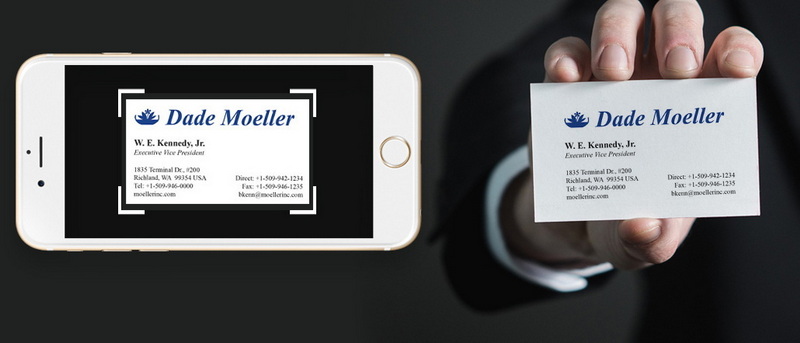
While mobile apps and dedicated scanners offer the most efficient and accurate solutions, manual scanning techniques can be employed in situations where these tools are not readily available. This approach involves using your smartphone camera to capture images of business cards and then utilizing OCR software to extract the text.
1. Positioning: Ensure that the business card is placed on a flat, well-lit surface to minimize shadows and distortion.
2. Camera Settings: Use your smartphone's camera app or a dedicated scanning app to optimize image quality. Adjust settings such as focus, exposure, and resolution to ensure a clear and sharp image.
3. Capture: Take a high-resolution photo of the business card, ensuring that the entire card is in focus and that the image is free from blur.
4. OCR Processing: Utilize an OCR app or online service to extract the text from the image. Popular OCR options include Google Docs, Adobe Acrobat, and online OCR converters.
Tips for Effective Business Card Scanning
To maximize the accuracy and efficiency of your business card scanning efforts, consider these best practices:
1. Ensure Good Lighting: Proper lighting is crucial for accurate OCR. Avoid shadows and glare by scanning in a well-lit environment or using a lamp to illuminate the business card.
2. Keep Cards Flat: Flattening business cards before scanning prevents distortion in the image, improving OCR accuracy. Use a heavy object or a document press to flatten curled or creased cards.
3. Review Scanned Data: Always double-check scanned information for accuracy before saving it to your contacts. Correct any errors in names, titles, phone numbers, or email addresses.
4. Organize Immediately: After scanning, categorize and tag contacts promptly. This makes it easier to find specific individuals when needed and ensures that your contact list remains organized.
5. Backup Regularly: Protect your valuable contact data by backing up your digital contacts regularly. Utilize cloud backup services or export your contact list to a secure location.
Managing Your Digital Contacts
Scanning business cards is only the first step. Effective management of your digital contacts is essential for maximizing the value of your network.
Use CRM Systems
Integrating scanned contacts with CRM systems like HubSpot, Salesforce, or Zoho CRM can streamline communication efforts and enhance relationship management. This allows you to track interactions, manage leads, and personalize your communication with each contact.
Regular Updates
Periodically review your digital contact list to remove duplicates, outdated information, or irrelevant contacts. This ensures that your contact list remains accurate and up-to-date.
Utilize Tags and Groups
Organize contacts into tags or groups based on industry, event, company, or other criteria. This allows you to quickly find specific individuals when needed and target your communication efforts more effectively.
Sync Across Devices
Ensure that your contact management system syncs across all devices, including smartphones, tablets, and computers. This provides seamless access to your contacts regardless of your location or the device you are using.
Conclusion
Business card scanning has evolved from a novelty to an essential practice in modern networking. By embracing the diverse methods available – from powerful mobile apps to dedicated scanners – professionals can efficiently digitize their contact lists, unlock the potential of their networks, and elevate their professional endeavors. Adhering to best practices for scanning and meticulously managing digital contacts ensures that valuable connections are never lost, always accessible, and ready to be leveraged for mutual growth and success.
In essence:
- Carefully select the scanning method that aligns with your specific needs and volume.
- Prioritize high-quality scans through optimized lighting, card preparation, and OCR review.
- Maintain a meticulously organized and regularly updated digital contact list.
By diligently implementing these strategies, you will not only streamline your networking processes but also cultivate a dynamic and readily accessible network poised to fuel your professional aspirations.
Related Questions
1. What are the best apps for scanning business cards?
Several top-rated apps include HubSpot Business Card Scanner, CamCard, ABBYY Business Card Reader, Covve Scan, and ScanBizCards.
2. How does OCR technology work in business card scanners?
OCR technology converts images of text into machine-readable text by analyzing the shapes of characters in an image.
3. Can I scan business cards using my smartphone camera?
Yes, you can use your smartphone camera along with OCR apps to scan business cards manually.
4. How do I ensure accurate data entry when scanning?
Always review scanned data for accuracy before saving it into your contacts; good lighting also helps improve OCR results.
5. Is there a way to back up my scanned contacts?
Most CRM systems offer cloud backup options; additionally, ensure regular exports of your contact list as a precautionary measure.
Citations:
1. https://www.pfu.ricoh.com/imaging/downloads/manual/ss_webhelp/en/help/webhelp/topic/fu_business_01.html
2. https://blog.hubspot.com/sales/business-card-scanner-apps
3. https://www.cnblogs.com/apachecn/p/18501888
4. https://play.google.com/store/apps/details?id=com.covve.businesscardscanner
5. https://iriscorporate.com/softwares/cardiris/
6. https://www.cnblogs.com/apachecn/p/18468930
7. https://www.doorway.io/blog/business-cards-to-google-contacts/
8. https://www.capacitorpartners.com/post/an-extensive-comparison-of-business-card-scanners-camcard-abbyy-covve-scan-bizconnect
9. https://www.hubspot.com/products/business-card-scanner-app


