Content Menu
● The Importance of Organizing Business Cards
● Physical Organization Methods
>> Business Card Books
>> Rotary Business Card Files (Rolodex)
>> Physical Card Filing Systems
● Digital Organization Methods
>> Business Card Scanning Apps
>> Contact Management Software (CRM)
>> Spreadsheet Software (e.g., Microsoft Excel)
● Cloud-Based Contact Management Tools
● Hybrid Approach
● Best Practices for Maintaining an Organized System
>> Sort Immediately
>> Establish a Routine
>> Add Notes
>> Purge Regularly
>> Back Up Data
>> Choose a System That Works for You
● Conclusion
● Frequently Asked Questions
>> 1. What is the best way to organize business cards alphabetically?
>> 2. How can I quickly scan business cards into my phone?
>> 3. What are the benefits of using a CRM system for business card organization?
>> 4. How do I eliminate duplicate business cards in my collection?
>> 5. What should I do with old or outdated business cards?
● Citations:
In today's fast-paced business environment, networking is a crucial component for success. Business cards remain a tangible representation of these connections, making them essential tools for professionals across various industries. However, the accumulation of business cards can quickly lead to disorganization, rendering them nearly useless. This article explores effective strategies for organizing business cards, both physically and digitally, to maintain a valuable and accessible network.

The Importance of Organizing Business Cards
Before diving into specific methods, it's important to understand why organizing business cards matters. Effective organization ensures that you can quickly retrieve contact information, follow up on leads, and maintain strong relationships. A well-organized system transforms a stack of cards into a dynamic and actionable database [7].
Physical Organization Methods
Business Card Books
One of the simplest and most traditional methods for organizing business cards is using a business card book or binder [7]. These books contain clear plastic sleeves with individual slots for each card.
Pros:
- Accessibility: Easy to flip through and reference cards [7].
- Protection: Protects cards from dirt, moisture, and damage [7].
- Portability: Relatively easy to carry and store.
Cons:
- Capacity: Limited by the number of sleeves in the book.
- Manual Sorting: Requires manual insertion and sorting of cards.
- Potential for Damage: Plastic sleeves can tear or become brittle over time.
To maximize the effectiveness of a business card book, consider the following:
- Alphabetical Order: Arrange cards alphabetically by last name for quick retrieval [7].
- Categorical Order: Group cards by industry, company, or job title to identify specific contacts [7].
- Regular Maintenance: Periodically review and update the book to remove outdated cards.
Rotary Business Card Files (Rolodex)
A rotary business card file, also known as a Rolodex, is another physical organization method that allows you to quickly sort through your business cards in a rolling cylinder [7].
Pros:
- Quick Access: Cards are easily accessible by rolling through the cylinder [7].
- Desk-Friendly: Designed to sit on a desk for easy reference [7].
- A-Z Sorting: Typically sorted alphabetically for fast retrieval [7].
Cons:
- Outdated Appearance: May look old-fashioned compared to modern methods [7].
- Limited Information: Can only display basic contact information.
- Space Consumption: Takes up desk space.
Tips for using a rotary business card file:
- Consistent Sorting: Maintain a strict alphabetical order to avoid misfiling.
- Regular Updates: Remove old or irrelevant cards to keep the file current.
- Labeling: Use labels to mark sections or categories for easier navigation.
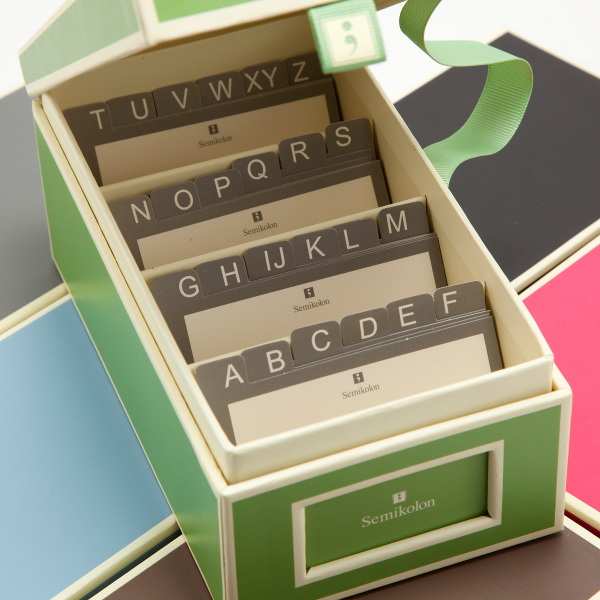
Physical Card Filing Systems
For those who prefer a more traditional filing system, business cards can be organized in file folders or card boxes [7].
Pros:
- Scalability: Can accommodate a large number of cards.
- Customizable: Allows for flexible categorization and labeling.
- Cost-Effective: Requires minimal investment in materials.
Cons:
- Time-Consuming: Requires significant time to set up and maintain.
- Space Requirements: Needs dedicated storage space for files or boxes.
- Manual Retrieval: Finding a specific card can be time-consuming.
Best practices for physical card filing systems:
- Clear Labeling: Use detailed labels to categorize cards by name, company, or industry.
- Consistent Filing: Establish a consistent filing system and stick to it.
- Regular Purging: Periodically review and remove outdated cards.
Digital Organization Methods
In the digital age, numerous tools and applications can streamline the process of organizing business cards. Digital methods offer advantages such as searchability, portability, and integration with other business tools [5].
Business Card Scanning Apps
Business card scanning apps use optical character recognition (OCR) technology to convert physical cards into digital contacts [8]. These apps capture the information on the card and automatically populate fields such as name, company, phone number, and email address [5].
Popular Apps:
- CamCard: Known for its seamless scanning and unlimited sharing capabilities [5].
- ABBYY Business Card Reader: Provides accurate text recognition and contact management features.
- ScanBizCards: Offers advanced features such as CRM integration and lead capture.
- Lcard: Business card scanner with advanced features [7].
- Bric App: Scan business cards and sync data to Google Contacts, Phone-book, MS Outlook and export cards as CSV file [1].
Pros:
- Efficiency: Quickly convert physical cards into digital format [5].
- Accuracy: OCR technology ensures accurate data extraction [8].
- Integration: Integrates with CRM systems, email clients, and other business tools [8].
- Shareability: Easily share contact information with others [5].
Cons:
- Cost: Some apps require a subscription fee for full functionality.
- Accuracy Issues: OCR may not be perfect, especially with handwritten or stylized cards [8].
- Privacy Concerns: Storing contact information in the cloud raises privacy issues.
Tips for using business card scanning apps:
- Choose the Right App: Select an app that meets your specific needs and budget.
- Verify Accuracy: Always double-check the scanned information for errors [8].
- Utilize Integrations: Connect the app to your CRM and other business tools [8].
- Regularly Back Up Data: Ensure your data is backed up to prevent loss.
Contact Management Software (CRM)
Contact management software, also known as customer relationship management (CRM) systems, provides a comprehensive solution for organizing and managing business contacts [8]. CRM systems offer advanced features such as lead tracking, sales automation, and customer communication management.
Popular CRM Systems:
- Salesforce: A leading CRM platform with robust contact management capabilities [8].
- Microsoft Dynamics 365: Integrates with other Microsoft products and offers comprehensive CRM features.
- Zoho CRM: A cloud-based CRM system with a user-friendly interface and affordable pricing.
Pros:
- Comprehensive Management: Manages all aspects of customer relationships.
- Advanced Features: Offers lead tracking, sales automation, and reporting.
- Collaboration: Facilitates collaboration among team members.
- Scalability: Can scale to accommodate growing business needs [8].
Cons:
- Complexity: Can be complex to set up and use.
- Cost: CRM systems can be expensive, especially for small businesses.
- Training Required: Requires training for users to fully utilize the system [8].
Best practices for using CRM systems:
- Define Clear Goals: Determine your specific CRM needs and goals.
- Choose the Right System: Select a CRM system that aligns with your business requirements.
- Provide Training: Train your team on how to use the CRM system effectively [8].
- Regularly Update Data: Keep your contact information up-to-date and accurate.
Spreadsheet Software (e.g., Microsoft Excel)
Spreadsheet software like Microsoft Excel can be used to create a simple yet effective digital database for business cards [7].
Pros:
- Familiarity: Most users are familiar with Excel.
- Customization: Allows for flexible data entry and formatting [7].
- Searchability: Easy to search and filter data.
- Cost-Effective: Typically included in office software suites.
Cons:
- Manual Data Entry: Requires manual entry of contact information [7].
- Limited Features: Lacks advanced features such as CRM integration.
- Potential for Errors: Manual data entry can lead to errors.
Tips for organizing business cards in Excel:
- Create Columns: Define columns for name, company, phone number, email, and other relevant information [7].
- Use Filters: Utilize filters to sort and search data [7].
- Data Validation: Implement data validation rules to ensure data accuracy.
- Regular Backups: Back up your spreadsheet regularly to prevent data loss.
Cloud-Based Contact Management Tools
Cloud-based contact management tools offer a convenient way to store and access business card information from anywhere with an internet connection.
Popular Tools:
- Google Contacts: A free and widely used contact management tool that integrates with other Google services [8].
- Evernote: A versatile note-taking app that can be used to store and organize business card information.
- Trello: A project management tool that can be used to track contacts and follow-up activities.
Pros:
- Accessibility: Access contact information from any device with an internet connection [8].
- Collaboration: Easily share contact information with others.
- Integration: Integrates with other cloud-based services [8].
- Automatic Backups: Data is automatically backed up to the cloud.
Cons:
- Internet Dependency: Requires an internet connection to access data.
- Security Concerns: Storing data in the cloud raises security concerns.
- Limited Features: May lack advanced features compared to CRM systems.
Best practices for using cloud-based contact management tools:
- Choose a Secure Provider: Select a reputable provider with strong security measures.
- Enable Two-Factor Authentication: Add an extra layer of security to your account.
- Regularly Update Data: Keep your contact information up-to-date and accurate.
- Utilize Folders and Tags: Use folders and tags to categorize and organize contacts.
Hybrid Approach
A hybrid approach combines physical and digital methods to leverage the benefits of both. For example, you might use a business card scanning app to digitize your cards and then store the physical cards in a business card book for safekeeping [7][5].
Pros:
- Flexibility: Combines the advantages of physical and digital methods.
- Redundancy: Provides a backup in case of data loss or technical issues.
- Personal Preference: Allows you to choose the methods that work best for you.
Cons:
- Complexity: Requires managing both physical and digital systems.
- Time Investment: May require more time to maintain both systems.
- Potential for Duplication: Need to ensure consistency between physical and digital records.
Best Practices for Maintaining an Organized System
Regardless of the method you choose, several best practices can help you maintain an organized business card system [7].
Sort Immediately
The key to maintaining an organized system is to sort business cards immediately after receiving them. Don't let them pile up on your desk or in your bag [7].
Establish a Routine
Set aside time each week to review and update your business card collection. This routine will help you stay on top of new contacts and ensure that your information is accurate [7].
Add Notes
When you receive a business card, jot down any relevant information, such as where you met the person, what you discussed, and any follow-up actions [7].
Purge Regularly
Periodically review your business card collection and remove outdated or irrelevant cards [7]. This process will keep your system streamlined and efficient.
Back Up Data
If you're using a digital system, regularly back up your data to prevent loss due to technical issues or human error [8].
Choose a System That Works for You
The most important factor in organizing business cards is to choose a system that works for you. Experiment with different methods until you find one that fits your needs and preferences [7].
Conclusion
Organizing business cards is an essential task for professionals who want to maintain a strong and accessible network. Whether you prefer physical methods like business card books and rotary files or digital solutions like scanning apps and CRM systems, the key is to establish a consistent system and stick to it. By following the best practices outlined in this article, you can transform a chaotic collection of cards into a valuable asset that helps you build and maintain meaningful business relationships [7][5][8].
Frequently Asked Questions
1. What is the best way to organize business cards alphabetically?
To organize business cards alphabetically, start by sorting the cards by the last name of the contact. If there are multiple cards with the same last name, sort them by the first name. In a physical system like a business card book or rotary file, insert the cards in alphabetical order. In a digital system like Excel or a CRM, use the sorting feature to arrange the contacts alphabetically by last name [7].
2. How can I quickly scan business cards into my phone?
You can quickly scan business cards into your phone using a business card scanning app like CamCard, ABBYY Business Card Reader, or ScanBizCards. These apps use OCR technology to capture the information on the card and automatically populate fields such as name, company, phone number, and email address. Simply open the app, take a photo of the card, and review the scanned information for accuracy [5][8].
3. What are the benefits of using a CRM system for business card organization?
Using a CRM system for business card organization offers several benefits. CRM systems provide comprehensive contact management capabilities, allowing you to track leads, manage customer interactions, and automate sales processes. They also facilitate collaboration among team members and offer scalability to accommodate growing business needs. Additionally, CRM systems integrate with other business tools, providing a centralized platform for managing all aspects of customer relationships [8].
4. How do I eliminate duplicate business cards in my collection?
To eliminate duplicate business cards, regularly review your collection and compare the information on each card. In a physical system, manually compare the cards and discard any duplicates. In a digital system, use the search and filter features to identify potential duplicates. Many business card scanning apps and CRM systems also have built-in features to detect and merge duplicate contacts [2][8].
5. What should I do with old or outdated business cards?
Old or outdated business cards should be removed from your collection to keep your system streamlined and efficient. Before discarding a card, review the information to see if there is anything you want to retain, such as notes or reminders. If the contact is no longer relevant, simply discard the card. If you want to maintain a record of the contact, you can scan the card and store it in a digital archive before discarding the physical card [7].
Citations:
[1] https://answers.microsoft.com/en-us/msoffice/forum/all/business-card-info-organizer/5c88a6c4-3abd-4269-8c4a-64e7fce36a0a
[2] https://iriscorporate.com/softwares/cardiris/
[3] https://qianni1997.github.io/otherPDF/lnotes2.pdf
[4] https://lcardapp.com/pages/struggling-to-keep-track-heres-how-to-organize-business-cards-digitally-with-ease/
[5] https://www.camcard.com
[6] https://github.com/haoweiguang/haoweiguang.github.io/blob/master/index.html
[7] https://www.shoeboxed.com/blog/5-effective-ways-to-store-your-business-cards/
[8] https://ambir.com/ambirscan-bcs/


