Content Menu
● Introduction
● What is an Electronic Business Card?
>> Key Features of Electronic Business Cards
● Benefits of Using Electronic Business Cards
>> Convenience
>> Cost Efficiency
>> Environmentally Friendly
>> Enhanced Features
>> Security
● How to Create an Electronic Business Card
>> Step 1: Choose a Digital Business Card Platform
>> Step 2: Customize Your Card
>> Step 3: Generate a QR Code
>> Step 4: Save and Share Your Card
● Best Practices for Using Electronic Business Cards
>> Maintain Consistency Across Platforms
>> Regularly Update Your Information
>> Use Analytics to Improve Networking Strategies
>> Leverage Social Media Integration
>> Utilize Follow-Up Strategies
● The Future of Electronic Business Cards
● Conclusion
● Frequently Asked Questions
>> 1. What platforms can I use to create an electronic business card?
>> 2. Can I update my electronic business card after sharing it?
>> 3. How do I share my electronic business card?
>> 4. Are there any costs associated with creating an electronic business card?
>> 5. Is it secure to share my contact information electronically?
● Citations:
Introduction
In today's digital age, traditional paper business cards are gradually being replaced by electronic business cards, commonly known as digital business cards. These modern alternatives not only provide convenience but also offer a range of features that enhance networking and contact sharing. This article will guide you through the process of creating an electronic business card, exploring its benefits, customization options, and sharing methods.
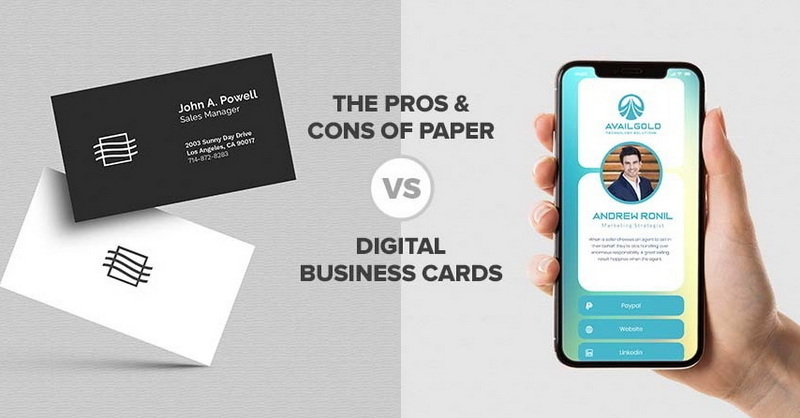
What is an Electronic Business Card?
An electronic business card is a digital version of the traditional paper business card. It typically contains essential contact information such as name, job title, company name, phone number, email address, and social media links. Unlike physical cards, electronic business cards can be easily updated and shared through various digital platforms.
Key Features of Electronic Business Cards
1. Instant Sharing: Electronic business cards can be shared instantly via email, QR codes, or NFC technology.
2. Real-Time Updates: Any changes made to the card are reflected immediately without the need for reprinting.
3. Analytics: Many digital card services offer analytics to track how often your card is viewed and shared.
4. Personalization: Users can customize the design to align with their brand identity.
5. Cost-Effective: Eliminates printing costs associated with traditional cards.
Benefits of Using Electronic Business Cards
Convenience
Electronic business cards are incredibly convenient. You can share your contact information with just a tap or a scan, making networking more efficient than ever. With smartphones becoming ubiquitous, having your business card readily available on your device ensures you never miss an opportunity to connect.
Cost Efficiency
Creating and managing electronic business cards typically incurs lower costs compared to printing physical cards. You avoid the expenses of design and reprints every time your information changes. Furthermore, many digital card platforms offer free versions with basic features that can serve individual professionals well.
Environmentally Friendly
By opting for electronic cards, you contribute to reducing paper waste, making it a more sustainable choice for networking. In an era where environmental consciousness is paramount, using digital solutions aligns with eco-friendly practices.
Enhanced Features
Digital business cards can include clickable links to your website or social media profiles, allowing recipients to connect with you easily. This interactivity not only makes it easier for potential clients or collaborators to reach you but also enhances your professional presence online.
Security
Many digital card platforms offer security features such as data encryption and secure sharing options, ensuring your information remains protected. Unlike physical cards that can be lost or stolen, electronic cards can be managed more securely.
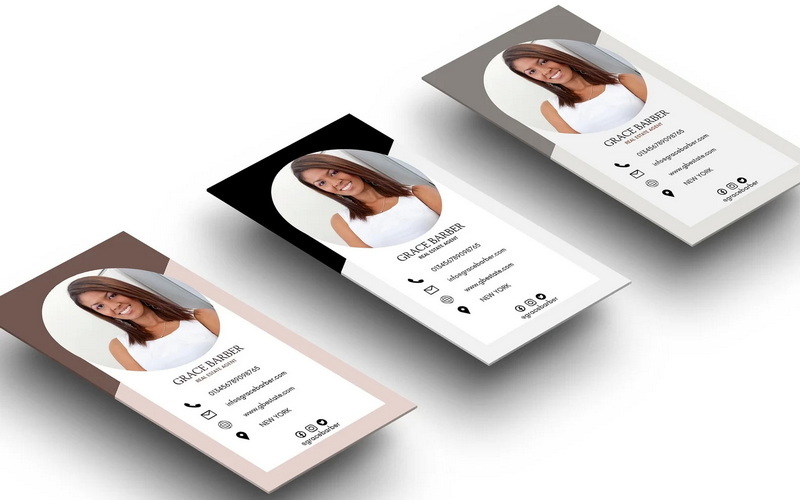
How to Create an Electronic Business Card
Creating an electronic business card can be done in several straightforward steps:
Step 1: Choose a Digital Business Card Platform
Select a platform that suits your needs. Popular options include Canva, HiHello, CamCard, and Wave Connect among others. Each platform has its unique features and pricing structures; therefore, it's essential to explore them before making a choice.
Step 2: Customize Your Card
Once you've chosen a platform:
- Upload Your Photo: Personalize your card with a professional headshot that reflects your personality and professionalism.
- Add Your Logo: If applicable, include your company logo for branding purposes—this helps in establishing brand recognition.
- Input Your Information: Fill in essential details such as:
- Name
- Job Title
- Company Name
- Phone Number
- Email Address
- Social Media Links (LinkedIn, Twitter)
- Design Elements: Customize colors, fonts, and layouts to match your brand identity. Ensure that the design is visually appealing yet professional; this will leave a lasting impression on those who receive it.
Step 3: Generate a QR Code
A QR code makes sharing your electronic business card effortless. Most platforms allow you to generate a QR code that links directly to your digital card. This feature is particularly useful at events where quick sharing is essential—attendees can scan your code instead of manually entering details.
Step 4: Save and Share Your Card
After designing your card:
- Save it in Various Formats: Ensure you have it in formats suitable for sharing (e.g., PNG or PDF). Some platforms also allow saving directly to mobile wallets for easy access.
- Share via Multiple Channels:
- Embed in email signatures for automatic sharing every time you send an email.
- Share through messaging apps like WhatsApp or Telegram.
- Use NFC tags for quick access—simply tap the tag with another NFC-enabled device.
- Add it to your digital wallet for easy retrieval during networking events.
Best Practices for Using Electronic Business Cards
To maximize the effectiveness of your electronic business card, consider implementing these best practices:
Maintain Consistency Across Platforms
Ensure that the information on your electronic business card matches what is displayed on other professional platforms such as LinkedIn or company websites. Consistency helps build trust and credibility among potential contacts.
Regularly Update Your Information
Since one of the main advantages of electronic business cards is the ability to update information easily, make it a habit to review and update your details regularly—especially after significant career changes or achievements.
Use Analytics to Improve Networking Strategies
If your chosen platform offers analytics features, take advantage of them! Analyzing how often your card is viewed or shared can provide insights into which networking strategies are working effectively and which may need adjustment.
Leverage Social Media Integration
Integrate social media links into your electronic business card strategically; this allows recipients to connect with you across multiple platforms easily. Be selective about which profiles you include—focus on those that best represent your professional persona.
Utilize Follow-Up Strategies
After sharing your electronic business card at events or meetings, follow up with new contacts through email or social media. A personalized message referencing where you met can significantly enhance relationship-building efforts.
The Future of Electronic Business Cards
As technology continues to evolve, so too will the functionality of electronic business cards. Emerging trends suggest we may see:
- Augmented Reality (AR) Features: Imagine pointing your phone at a physical location and seeing virtual elements linked to professionals in that area.
- Integration with Virtual Networking Events: As remote work becomes more prevalent, expect digital business cards to play an even larger role in virtual networking environments.
- Enhanced Personalization through AI: Future platforms may use artificial intelligence to suggest optimal designs based on user preferences and industry standards.
These advancements will likely make electronic business cards even more integral to professional networking strategies.
Conclusion
Creating an electronic business card is an effective way to modernize your networking strategy. With their numerous advantages—such as convenience, cost-effectiveness, real-time updates—digital business cards are becoming essential tools for professionals across various industries.
Frequently Asked Questions
1. What platforms can I use to create an electronic business card?
You can use platforms like Canva, HiHello, CamCard, Wave Connect among others.
2. Can I update my electronic business card after sharing it?
Yes! One of the significant advantages of electronic business cards is that you can update them in real-time without needing to resend them.
3. How do I share my electronic business card?
You can share it via email, QR code scanning, NFC technology, or through messaging apps.
4. Are there any costs associated with creating an electronic business card?
Many platforms offer free versions; however, premium features may require payment.
5. Is it secure to share my contact information electronically?
Yes! Most digital business card services include security features like data encryption and secure sharing options.
Citations:
[1] https://support.microsoft.com/en-us/office/create-and-share-contacts-as-electronic-business-cards-da84e482-47f5-4be0-ae75-d31ac04f9e04
[2] https://bitly.com/blog/benefits-of-digital-business-cards/
[3] https://github.com/haoweiguang/haoweiguang.github.io/blob/master/index.html
[4] https://blog.aweber.com/learn/digital-business-card.htm
[5] https://www.destinationcrm.com/Articles/Web-Exclusives/Viewpoints/5-Benefits-of-Digital-Business-Cards-157643.aspx
[6] https://qianni1997.github.io/otherPDF/lnotes2.pdf
[7] https://www.youtube.com/watch?v=w9WXoKe4G64
[8] https://www.uniqode.com/blog/digital-business-card-basics/benefits-of-digital-business-cards
[9] https://www.youtube.com/watch?v=QNxjdEC0zDQ
[10] https://www.doorway.io/blog/what-is-a-digital-business-card/
[11] https://wavecnct.com/blogs/news/how-to-create-digital-business-cards


