Content Menu
● Understanding the Importance of Business Cards
● Designing Your Business Card
>> Choosing the Right Size
>> Selecting a Layout
>> Choosing Colors and Fonts
>> Including Additional Elements
● Preparing Your Design for Print
>> File Format
>> Bleed and Safe Area
>> Color Mode
● Choosing Printing Methods
>> Home Printing
>> Professional Printing Services
● Printing Process
>> Test Prints
>> Final Adjustments
>> Printing Your Cards
● Common Mistakes to Avoid
● Conclusion
● Frequently Asked Questions
>> 1. What is the standard size of a business card?
>> 2. Can I print my business cards at home?
>> 3. What paper thickness should I use for business cards?
>> 4. How do I ensure my design prints correctly?
>> 5. What additional features can I add to my business card?
● Citations:
Creating and printing business cards is an essential skill for professionals, entrepreneurs, and anyone looking to network effectively. A well-designed business card can leave a lasting impression and serve as a tangible representation of your brand. This comprehensive guide will walk you through the entire process of designing and printing business cards, from choosing the right materials to understanding printing techniques and ensuring the final product meets your expectations.
Understanding the Importance of Business Cards
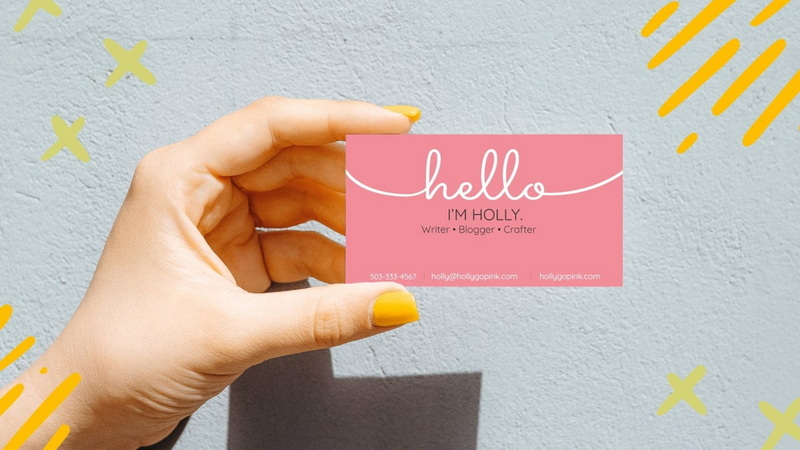
Business cards are more than just pieces of paper with contact information; they are a reflection of your brand identity and professionalism. Here are some reasons why business cards are crucial:
- First Impressions: A business card is often the first physical item a potential client or partner receives from you. It sets the tone for your professional relationship.
- Networking Tool: Business cards facilitate networking opportunities by making it easy to share your contact information.
- Brand Representation: Your card should reflect your brand's personality, values, and aesthetic. It's an extension of your marketing efforts.
- Convenience: Having a physical card makes it easy for people to remember you and reach out later.
Designing Your Business Card
The design phase is critical in creating an effective business card. Here's how to approach it:
Choosing the Right Size
The standard size for business cards in the U.S. is 3.5 inches by 2 inches. However, you can opt for different dimensions based on your industry or personal preference.
Selecting a Layout
When designing your card, consider the following layout elements:
- Logo: Ensure your logo is prominent and clear.
- Contact Information: Include essential details such as your name, job title, company name, phone number, email address, and website.
- White Space: Utilize white space effectively to avoid clutter and enhance readability.
Choosing Colors and Fonts
Colors and fonts convey a lot about your brand:
- Color Scheme: Choose colors that align with your brand identity. Use contrasting colors for text to ensure readability.
- Font Selection: Use professional fonts that are easy to read. Avoid overly decorative fonts that may detract from the message.
Including Additional Elements
Consider adding elements like:
- Tagline: A short phrase that encapsulates what you do.
- Social Media Links: If relevant, include links to your professional social media profiles.
- QR Codes: These can link to your website or portfolio for easy access.
Preparing Your Design for Print
Once you have your design ready, it's crucial to prepare it correctly for printing:
File Format
Save your design in a print-ready format such as PDF or TIFF. Ensure that all images are high resolution (300 DPI) to avoid pixelation.
Bleed and Safe Area
Include a bleed area of at least 0.125 inches around the edges of your design to prevent any white edges after trimming. Keep important text within the safe area (usually 0.125 inches from the edge).
Color Mode
Use CMYK color mode for printing as it provides a more accurate representation of how colors will appear on paper compared to RGB mode used for screens.
Choosing Printing Methods
You have several options when it comes to printing your business cards:
Home Printing
If you choose to print at home, ensure you have:
- A quality printer (inkjet or laser) capable of handling cardstock.
- High-quality cardstock (preferably 14pt or thicker) suitable for business cards.
- Proper printer settings adjusted for thickness and type of paper being used.
Professional Printing Services
Using a professional printing service has its advantages:
- Access to high-quality materials and finishes.
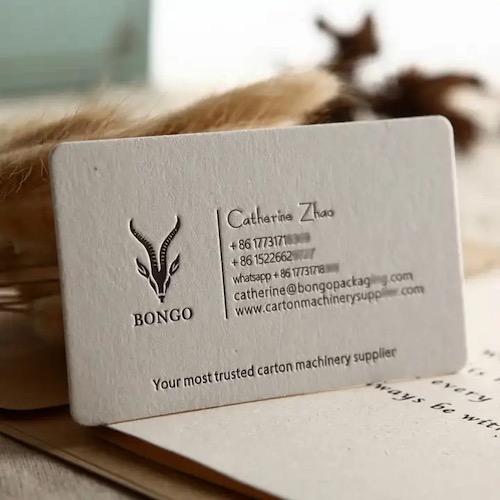
- Expertise in printing techniques that can enhance the look of your cards (e.g., embossing, foil stamping).
- Ability to order in bulk at lower costs per card.
Printing Process
Here's a step-by-step guide on how to print your business cards:
Test Prints
Before printing a large batch, do test prints on regular paper to check layout, colors, and overall design.
Final Adjustments
Make any necessary adjustments based on test prints before proceeding with the final print run.
Printing Your Cards
If using a home printer:
1. Load cardstock into the printer.
2. Select the correct settings (paper size, type).
3. Print a test page first.
4. Print the final batch once satisfied with the test print results.
If using a professional service:
1. Upload your design file according to their specifications.
2. Choose paper type, finish, and quantity.
3. Review proofs provided by the service before final approval.
Common Mistakes to Avoid
When designing and printing business cards, be mindful of these common pitfalls:
- Using low-quality images or graphics that can appear pixelated when printed.
- Overloading the card with too much information or cluttered designs that confuse rather than inform.
- Forgetting essential details like contact information or leaving out social media handles if relevant.
Conclusion
Printing business cards is an essential part of establishing a professional presence in any industry. By carefully considering design elements, preparing files correctly for print, and choosing appropriate printing methods, you can create impactful business cards that leave a lasting impression on potential clients and partners alike.
Frequently Asked Questions
1. What is the standard size of a business card?
The standard size for business cards in the U.S. is 3.5 inches by 2 inches.
2. Can I print my business cards at home?
Yes, you can print your business cards at home using a quality printer and suitable cardstock; however, professional printing services often provide better quality results.
3. What paper thickness should I use for business cards?
A thickness of at least 14pt is recommended for durability; thicker options like 16pt or even up to 32pt can enhance professionalism.
4. How do I ensure my design prints correctly?
Use CMYK color mode, save files in high-resolution formats like PDF or TIFF, include bleed areas, and conduct test prints before finalizing orders.
5. What additional features can I add to my business card?
Consider adding elements such as QR codes linking to websites or portfolios, social media handles, or unique finishes like embossing or foil stamping for added impact.
Citations:
[1] https://www.compandsave.com/blog/posts/how-to-print-business-cards-at-home-the-ultimate-guide.html
[2] https://replicaprinting.com/2015/07/the-printing-process-of-a-business-card/
[3] https://www.4over4.com/content-hub/stories/how-to-layout-business-cards-for-printing
[4] https://www.printrunner.com/blog/business-card-printing-questions/
[5] https://tapmo.in/blogs/news/faqs-about-business-cards-everything-you-need-to-know
[6] https://www.swiftpublisher.com/useful-articles/tips-for-printing-business-cards
[7] https://support.microsoft.com/en-us/office/print-a-sheet-of-business-cards-with-publisher-0f824994-f902-42ae-8683-49c2a200cf61
[8] https://smartpress.com/support/product-faq/business-card-printing-faq
[9] https://www.namecheap.com/visual/card-maker/faqs/
[10] https://www.bannerbuzz.com/blog/8-key-questions-to-ask-before-buying-business-cards/
[11] https://www.absolutecp.co.uk/the-letterpress/important-questions-about-business-cards
[12] https://vegasinkandtoner.com/blogs/news/the-5-most-popular-printing-techniques-for-business-cards
[13] https://www.reddit.com/r/graphic_design/comments/9m1rxl/printers_how_would_you_like_designers_to_send/
[14] https://www.youtube.com/watch?v=tkqAemcu1jE
[15] https://www.befunky.com/learn/print-your-own-business-cards/
[16] https://www.indeed.com/career-advice/career-development/business-card-tips
[17] https://www.neo.space/blog/business-card-design
[18] https://www.carddsgn.com/10-best-printing-methods-for-your-new-business-card/
[19] https://printastik.net/printing/5-tips-for-creating-effective-business-cards/
[20] https://www.youtube.com/watch?v=e79J9r8YsAY
[21] https://theprintcompany.com.au/A-Comprehensive-Guide-to-Printing-Business-Cards~128535
[22] https://www.greenerprinter.com/support/business-cards-faqs/
[23] https://www.brandly.com/blog/questions-business-card-vendor/
[24] http://www.graphicdisorder.com/business-card-faq
[25] https://www.plasticprinters.com/business-card-questions
[26] https://www.reddit.com/r/CommercialPrinting/comments/13o57lj/looking_into_business_card_printing/
[27] https://www.reddit.com/r/smallbusiness/comments/17uf13v/business_card_printing_questions/
[28] https://graphicdesign.stackexchange.com/questions/830/making-a-business-card-any-advice
[29] https://www.youtube.com/watch?v=XIBD-1zcSfQ
[30] https://www.displays2go.com/Guide/How-To-Design-Most-Professional-Business-Cards-5
[31] https://blog.spoongraphics.co.uk/tutorials/how-to-prepare-a-business-card-design-for-print


