Content Menu
● What Is a POP Display?
● What Is a POS Display?
● POP vs POS Display: Key Differences at a Glance
>> Core functional differences
● Why the POP vs POS Distinction Matters for Brands
● From a Manufacturer's Perspective: How We Design POP vs POS Displays
>> POP display design priorities (aisles and promo zones)
>> POS display design priorities (checkout zones)
● POP vs POS: Which Should You Recommend to Clients?
● Practical Design Guidelines: POP vs POS (Expert Tips)
>> POP display best practices
>> POS display best practices
● Step‑by‑Step: How to Choose Between POP and POS for a New Campaign
● CTA
● FAQ: POP vs POS Display
● References
POP displays focus on influencing purchase decisions throughout the shopper's journey in-store, while POS displays are a very specific subset placed at or near the checkout area to capture last‑minute impulse buys. For a print and packaging manufacturer like Shenzhen XingKun Packing Products Co., Ltd., understanding this distinction is critical to designing the right cardboard display stands and pitching the right solution to brand and retail clients. [meyers]
What Is a POP Display?
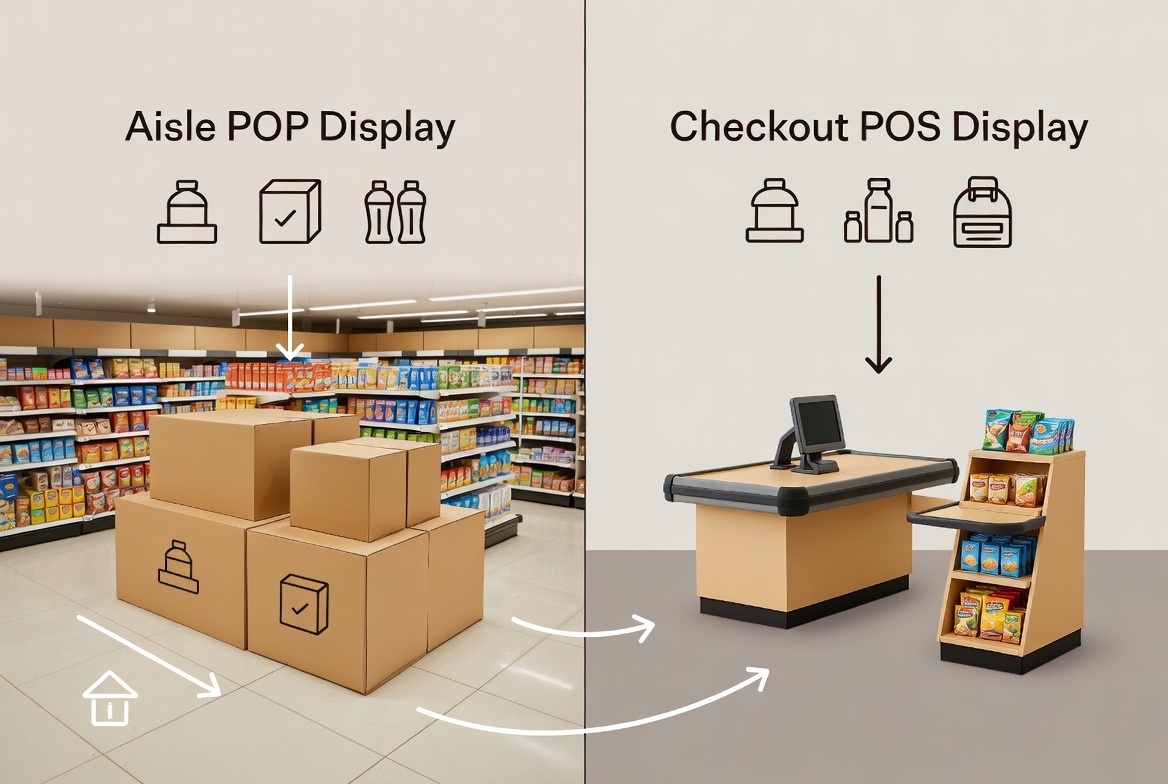
A POP (Point‑of‑Purchase) display is any in‑store display used to promote products at or around the point where buying decisions are made, not just at the cash register. As a manufacturer of printed display stands, this usually means floor displays, end‑cap units, pallet displays, dump bins, and freestanding cardboard stands placed in key traffic zones. [popdisplay]
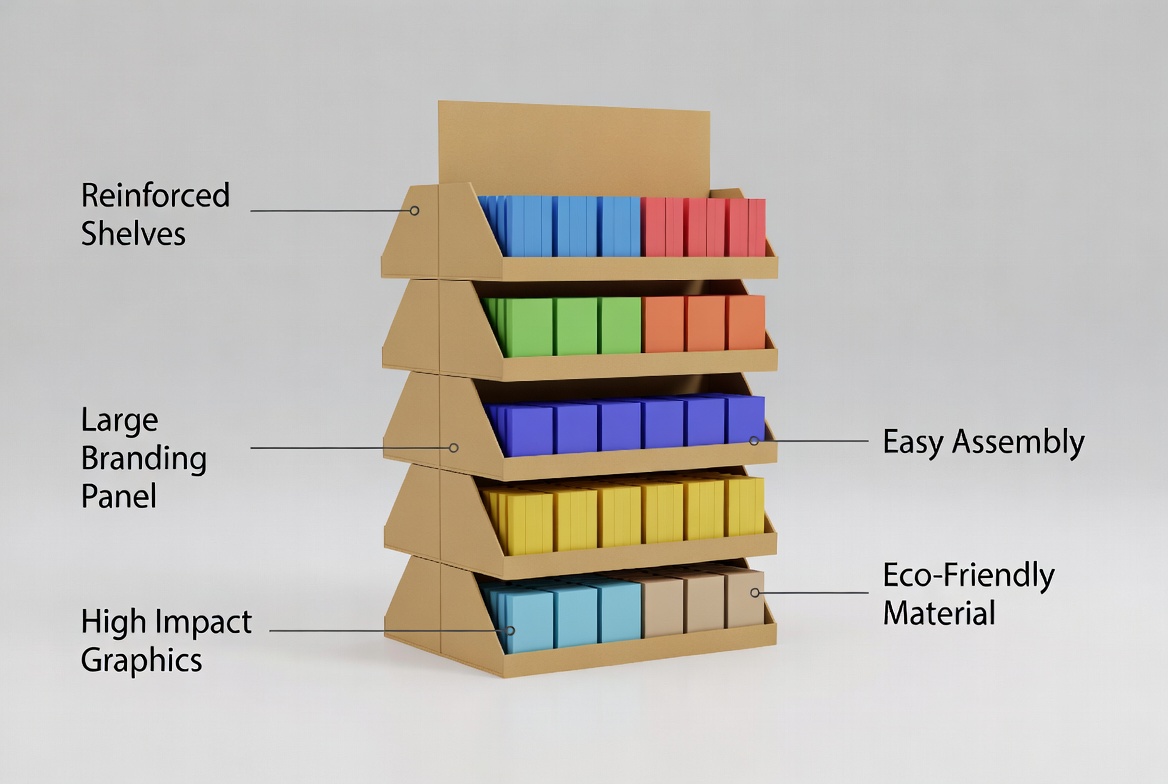
From my manufacturing and retail marketing experience, POP displays are about shaping the shopper's journey: grabbing attention in the aisle, educating customers, and guiding them toward a particular SKU, bundle, or promotion. Well‑designed POP units often combine strong structural design, high‑impact printing, and easy assembly to make deployment efficient for global brands and distributors. [digitalsignagetoday]
What Is a POS Display?
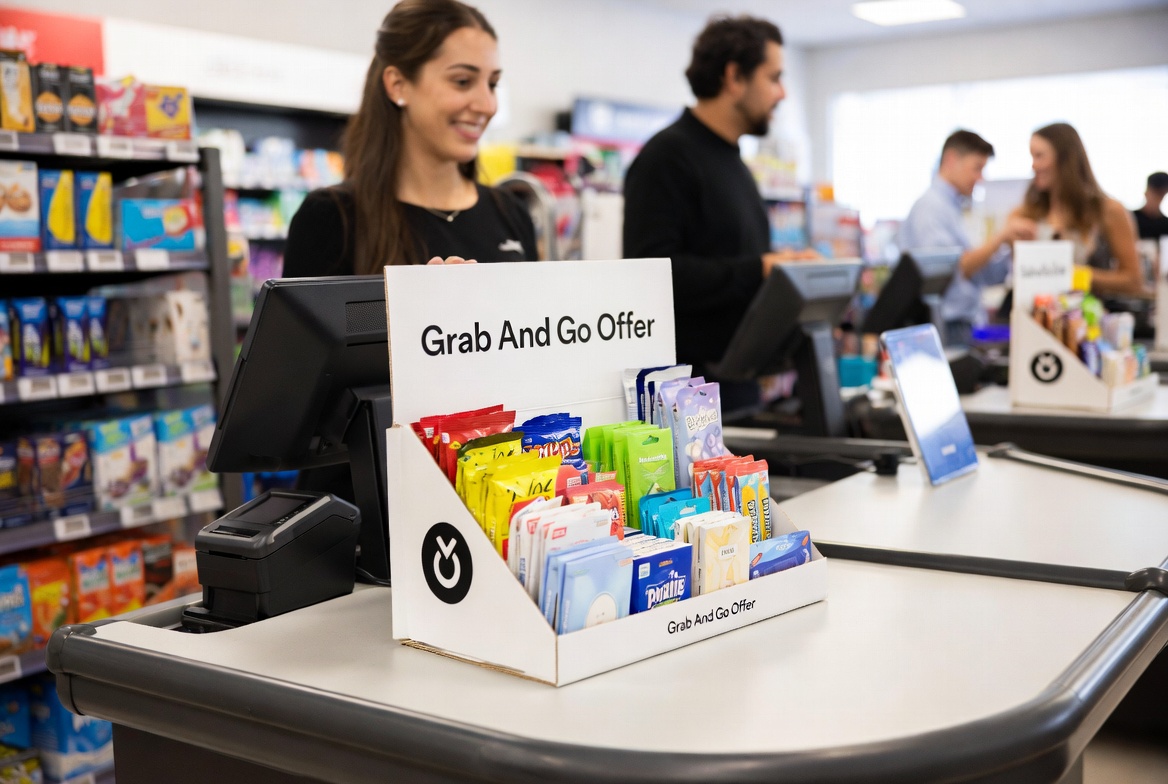
A POS (Point‑of‑Sale) display is positioned at or extremely close to the checkout area—cash wrap, service counter, or self‑checkout zone. These displays target shoppers in the final moments before payment, where basket decisions are already made but impulse add‑ons are still highly likely. [meyers]
In practice, POS displays are often compact countertop units, small floor stands, or hanging displays specifically engineered to fit tight spaces, respect cashier workflow, and keep payment terminals clear. As a producer, you must pay special attention to precise dimensions, stability, and ease of replenishment, because store staff will interact with these units constantly during a shift. [popdisplay]
POP vs POS Display: Key Differences at a Glance
Core functional differences
| Factor | POP Display | POS Display |
| Location in store | Anywhere from entrance to aisle and promo zones. (digitalsignagetoday) | Very close to checkout or payment terminals. (meyers) |
| Main objective | Influence product discovery, comparison, and consideration. (digitalsignagetoday) | Drive impulse add‑on purchases at the last moment. (meyers) |
| Typical formats | Floor stands, pallet displays, end‑caps, dump bins. (popdisplay) | Countertop units, small floor stands, hanging racks. (meyers) |
| Dwell time | Longer; shoppers are browsing, comparing, reading. (digitalsignagetoday) | Short; shoppers are waiting to pay, often distracted. (digitalsignagetoday) |
| Messaging style | More educational: features, benefits, cross‑selling. (digitalsignagetoday) | Short, bold, price‑ and urgency‑driven. (digitalsignagetoday) |
| Design constraints | More floor space, more visual storytelling possible. (digitalsignagetoday) | Strict space limits, must not obstruct checkout. (digitalsignagetoday) |
From a UX and retail execution standpoint, the same cardboard structure can perform very differently depending on whether it's placed as POP or POS, so design decisions must be location‑led, not just artwork‑led. [digitalsignagetoday]
Why the POP vs POS Distinction Matters for Brands
Retailers and brands often use "POP" and "POS" interchangeably, but mis‑labeling can cause expensive production and deployment mistakes—for example, ordering a "counter stand" that is actually too deep for a narrow checkout counter. From my work with international B2B clients, I see three recurring issues when this distinction is ignored: [popdisplay]
- Wrong dimensions for the real environment, causing units to be rejected at store level. [popdisplay]
- Misaligned messaging (too much text at checkout, not enough education in the aisle). [digitalsignagetoday]
- Inefficient budget allocation, e.g., investing in premium finishes for a display that shoppers only see for one second while queueing. [digitalsignagetoday]
By clarifying POP vs POS in your briefs and sales material, you immediately look more professional to overseas buyers and retail category managers. [siteimprove]
From a Manufacturer's Perspective: How We Design POP vs POS Displays
With over 20 years of experience producing display stands and printed packaging for brands in more than 30 countries, a manufacturer like Shenzhen XingKun typically approaches POP and POS projects very differently. [holidaypac]
POP display design priorities (aisles and promo zones)
For POP units, I recommend focusing on:
- Structural impact: taller profiles, multiple shelves, side panels for branding. [popdisplay]
- Visual storytelling: large graphics, brand imagery, and space for explanations or usage instructions. [vwo]
- Durability and load capacity: especially for beverages, FMCG, or seasonal promotions that must run for weeks. [holidaypac]
These projects often benefit from 3D prototypes and test assemblies before mass production, especially when exported flat‑packed to multiple markets. [holidaypac]
POS display design priorities (checkout zones)
For POS units, I shift priorities to:
- Footprint and ergonomics: small base, shallow depth, no sharp corners facing the cashier. [unosquare]
- Ultra‑fast setup: pre‑glued or auto‑lock bases that store staff can assemble within minutes. [holidaypac]
- Clear price and offer visibility: bold pricing, simple callouts like "Grab & Go" or "Limited Time". [vwo]
Because checkout areas are audited more strictly by retailers, visual guidelines, safety standards, and exact measurements must be confirmed early in the design process. [unosquare]
POP vs POS: Which Should You Recommend to Clients?
From an expert consulting point of view, you should never answer this with a single word like "POP" or "POS". Instead, diagnose based on product type, price point, and shopper behavior. [siteimprove]
POP displays are ideal when:
- You are launching a new product that needs explanation or trial. [digitalsignagetoday]
- The brand wants to own a category block on the shelf or in a promotional aisle. [digitalsignagetoday]
- You need room for larger quantities and multiple SKUs, e.g., flavor ranges, bundle packs. [digitalsignagetoday]
POS displays are ideal when:
- The product is low‑risk, low‑involvement, and easy to add spontaneously (snacks, batteries, small electronics accessories). [digitalsignagetoday]
- The goal is strictly basket‑size uplift, not long‑term brand building. [digitalsignagetoday]
- The retailer allows only very limited space at checkout, but wants strong margin on small, fast‑moving items. [digitalsignagetoday]
In many successful retail programs, brands combine both: POP displays create demand in the aisle, while POS displays capture incremental units at checkout. [digitalsignagetoday]
Practical Design Guidelines: POP vs POS (Expert Tips)
POP display best practices
When I help clients brief or evaluate POP display projects, I focus on:
1. Align with shopper flow
Place displays at natural decision points—end‑caps, category entries, or promotional islands—so shoppers see the unit before they reach the main shelf. [digitalsignagetoday]
2. Optimize for UX and readability
- Keep key messages at eye level.
- Use short headlines, large fonts, and high‑contrast color blocks. [vwo]
- Let images, not long paragraphs, communicate usage or results. [vwo]
3. Simplify replenishment
Design shelf heights and product pockets so staff can restock quickly, which keeps displays looking "full" and premium. [unosquare]
POS display best practices
For POS, the design rules are tighter:
1. Respect checkout ergonomics
The display must not block card terminals, scanners, or customer belongings. [unosquare]
2. Make the offer instantly clear
Shoppers in a queue do not read paragraphs; use one strong benefit line, one visual, one price. [vwo]
3. Design for impulse
Use scarcity, small bundles, and ready‑to‑grab packaging formats to encourage "why not" decisions. [digitalsignagetoday]
By translating these guidelines into your structural design and print files, you increase both sell‑in (convincing the retailer) and sell‑through (actual sales performance). [siteimprove]
Step‑by‑Step: How to Choose Between POP and POS for a New Campaign
To make this article immediately useful, here is a practical decision flow you can integrate into the content:
1. Clarify the campaign goal
- Brand awareness and product education → prioritize POP.
- Basket size and impulse add‑ons → prioritize POS. [digitalsignagetoday]
2. Analyze shopper behavior and price point
- Higher price, more comparison, or new category → POP aisle displays to allow research and evaluation. [digitalsignagetoday]
- Low price, easy yes/no decision → POS checkout units for quick add‑ons. [digitalsignagetoday]
3. Check retailer constraints
- Ask for display guidelines: allowed dimensions, materials, and zones. [digitalsignagetoday]
- Confirm whether both POP and POS placements are possible; many brands run them as a combined program. [digitalsignagetoday]
4. Define structural and printing needs
- POP: more shelves, stronger board, larger graphic areas. [holidaypac]
- POS: compact footprint, lighter structure, strong top header. [popdisplay]
5. Prototype, test, then scale
Start with a small batch, collect feedback from store staff and sales data, then refine and roll out across regions. [siteimprove]
This simple framework doubles as a consultative sales script your overseas sales and marketing teams can use in calls, emails, and trade shows.
CTA
Ready to plan your next POP or POS campaign?
Our team at Shenzhen XingKun has over 20 years of experience designing and producing custom cardboard display stands for brands in more than 30 countries. Share your product details, target market, and retail environment, and we'll recommend whether POP, POS, or a combined solution will deliver the best ROI for your next launch.
FAQ: POP vs POS Display
1. Are POP and POS displays the same thing?
No. POP covers all in‑store areas where purchase decisions happen, while POS refers strictly to displays at or very near the checkout area. [meyers]
2. Which drives more sales: POP or POS?
It depends on the product and category. POP often supports overall brand and category growth, while POS excels at incremental impulse units for low‑priced items. [digitalsignagetoday]
3. What materials are best for POP and POS displays?
For temporary campaigns, corrugated cardboard displays are common due to low cost, print quality, and ease of shipping; metal or plastic may be used for longer‑term fixtures. [popdisplay]
4. How long should a POP display campaign run?
Many FMCG and seasonal campaigns run for 4–12 weeks, but duration should follow retailer plans, product shelf life, and promotional calendars. [digitalsignagetoday]
5. Can one display design serve as both POP and POS?
Sometimes, but it's risky. POS environments have stricter size and safety limits, so it's usually better to adapt the structure for each location, even if artwork is shared. [popdisplay]
References
1. Meyers – "POP vs. POS Displays: Which is Best for Your Business?"
<https://meyers.com/meyers-blog/pop-vs-pos-displays-which-is-best-for-your-business/> [meyers]
2. Digital Signage Today – "Point-of-Purchase (POP) Display: How They Work & Their Retail Impact"
<https://www.digitalsignagetoday.com/blogs/point-of-purchase-pop-display-how-they-work-their-retail-impact/> [digitalsignagetoday]
3. PopDisplay – "商店陈列布置叫什么?"
<https://popdisplay.me/> [popdisplay]
4. Siteimprove – "SEO for manufacturing: Boost your search presence"
<https://www.siteimprove.com/glossary/seo-for-manufacturing/> [siteimprove]
5. Vital Design – "8 SEO Tips for Manufacturers"
<https://vitaldesign.com/manufacturing-seo/> [vitaldesign]
6. VWO – "eCommerce Product Page Best Practices"
<https://vwo.com/blog/ecommerce-product-page-design/> [vwo]
7. Unosquare – "Best Practices for E-Commerce UX Design"
<https://www.unosquare.com/blog/best-practices-for-e-commerce-ux-design/> [unosquare]
8. Holidaypac – "定制 POS POP 纸板展示架"
<https://www.holidaypac.com/zh-CN/floor-displays/custom-pos-pop-cardboard-display-stands.html> [holidaypac]
9. WSInetAdvantage – "How to Build a Successful SEO Strategy for Your Manufacturing Business"
<https://www.wsinetadvantage.com/build-successful-seo-strategy-manufacturing-business/> [wsinetadvantage]
10. Forbes Advisor – "POP Vs. POS: What's The Difference?"
<https://www.forbes.com/advisor/business/software/pop-vs-pos/> [forbes]


